> For the complete documentation index, see [llms.txt](https://docs.dbnl.com/llms.txt). Markdown versions of documentation pages are available by appending `.md` to page URLs; this page is available as [Markdown](https://docs.dbnl.com/configuration/model-connections.md).
# Model Connections
How to hook up LLMs to DBNL
{% hint style="info" %}
**Distributional is now** [**Talaria Scientific**](https://talariasci.com)**.** The DBNL product described in these docs has been sunset; this documentation is preserved for reference. Read [the announcement](https://distributional.com/blog/distributional-is-now-talaria).
{% endhint %}
### Why does DBNL require a Model Connection?
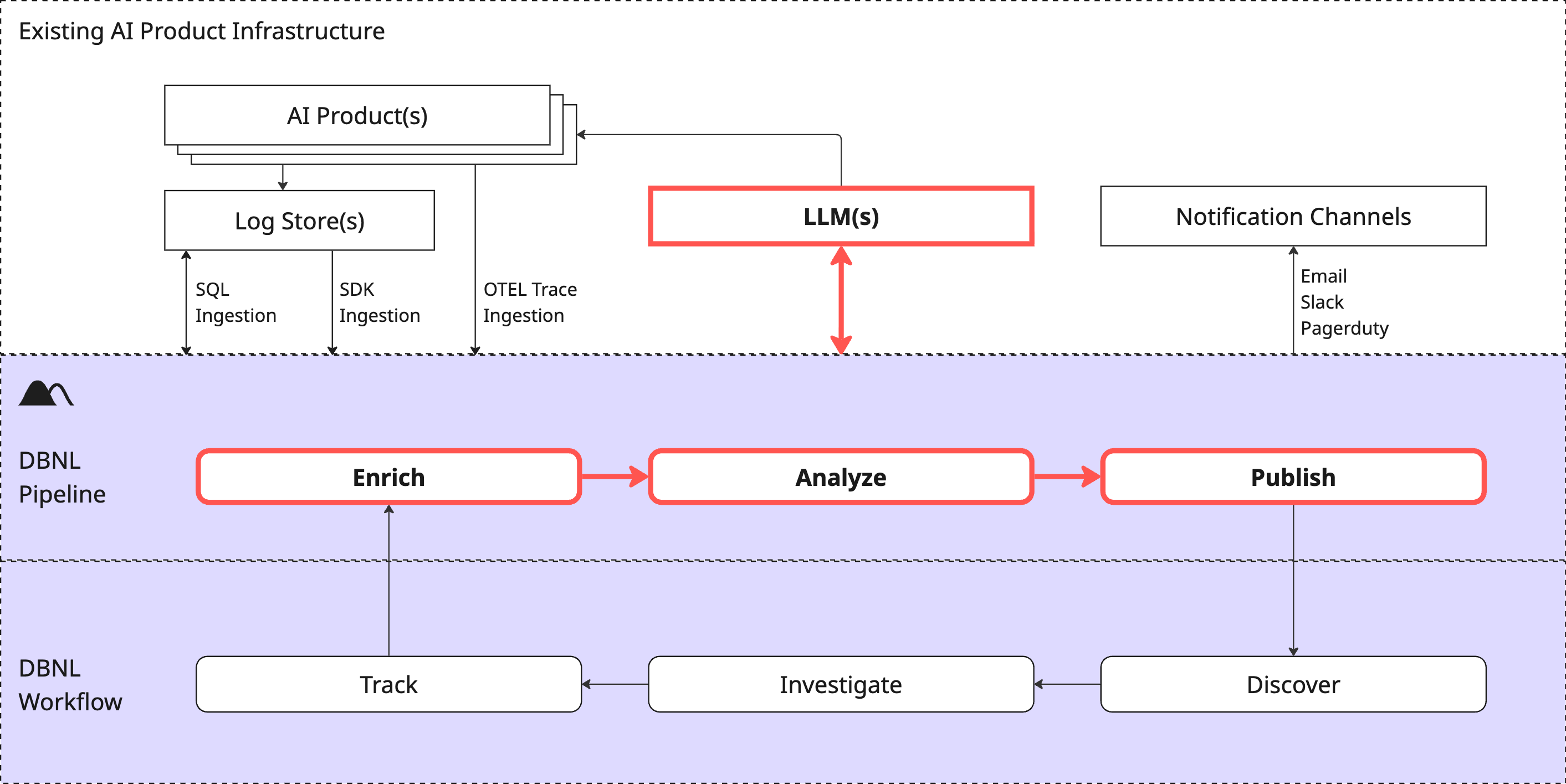
Model Connections are how DBNL interfaces with LLMs, which is required for each step of the [DBNL Data Pipeline](/configuration/data-pipeline.md) to function. It enables DBNL to
* Compute LLM-as-judge Metrics as part of the enrich step.
* Perform certain unsupervised analytics processes as part of the analysis step.
* Translate surfaced behavioral signals into human readable [Insights](/workflow/insights.md) as part of the publish step.
{% hint style="warning" %}
The Model Connection will be called many times per day per project (for every LLM-as-judge metric, for analysis steps, for Insight generation, etc). We recommend cutting a new API key for your DBNL Model Connection so you can monitor and budget usage. See [Types of Model Connections](#types-of-model-connections) for tradeoffs on different approaches.
{% endhint %}
### Types of Model Connections
Fundamentally a Model Connection needs to be able to expose a LLM chat completion interface that is accessible by your DBNL deployment. It can be
* An externally managed service (e.g. together.ai, OpenAI, etc)
* A cloud managed service that is part of your VPC (e.g. Bedrock, Vertex, etc)
* A locally managed deployment (e.g. a cluster of NVIDIA NIMs running in your DBNL k8s cluster as part of your deployment)
There are pros and cons to each of these approaches:
| Model Connection Type | Pros | Cons |
| ----------------------------------------------------------------- | ---------------------------------------------------------------------------------------------------------------------------------------------------- | ------------------------------------------------------------------------------------------------------------------------------------ |
|
Externally managed service (together.ai, OpenAI, etc)
|
Fast and easy to set up (just provide keys)
Model and scaling flexibility
|
Requires sending data outside of your cloud environment
Higher cost, on demand model
|
|
Cloud managed service (Bedrock, Vertex, etc)
|
Data stays within your cloud provider
Often managed by another team within the organization
|
Can be higher cost than locally running models
Usage, rate limits are typically shared across organization
|
|
Locally managed deployment (NVIDIA NIMs in k8s cluster)
|
Data stays within your local deployment
Cheaper than a managed service
Maximum control of cost vs timing tradeoffs
|
Requires access to GPU resources
Can require local admin and debugging
|
### Recommended Model Connections
The following models are known to work well for LLM-as-judge, analysis, and Insight generation.
* [OpenAI's GPT-OSS-20B](https://platform.openai.com/docs/models/gpt-oss-20b)
* [NVIDIA's Llama-3.3-Nemotron-Super-49B-v1.5](https://build.nvidia.com/nvidia/llama-3_3-nemotron-super-49b-v1_5/modelcard)
* [Qwen's Qwen3-Next-80B-A3B-Instruct](https://huggingface.co/Qwen/Qwen3-Next-80B-A3B-Instruct)
We recommend using a similar "mid-size" model that trades off speed, cost, and quality well.
### Creating a Model Connection
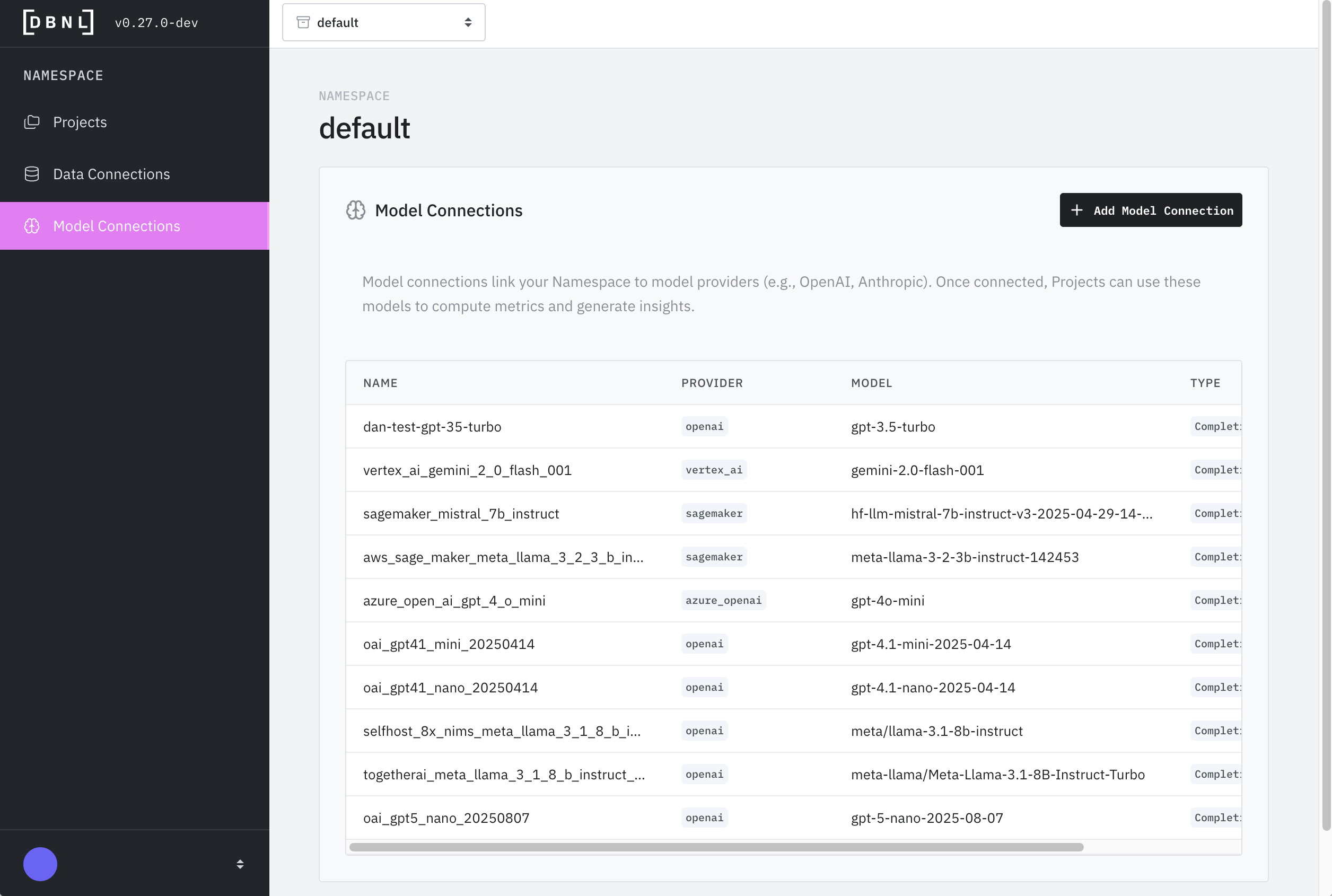
Model Connections are defined at the [Namespace](/platform/administration.md#namespaces) level of an [Organization](/platform/administration.md#organizations) and can be used by any [Projects](/workflow/projects.md) within the Namespace. For convenience, a new Model Connection can be created as part of the [Project Creation](/workflow/projects.md#creating-a-project) flow as well.
A Model Connection has the following attributes:
* **Name** (required): How the Model Connection is referenced when setting a default Model Connection for a project or LLM-as-judge [Metric](/workflow/metrics.md).
* **Description** (optional): Human readable description of the connection for reference.
* **Model** (required): The model name to be used as part of the API call (e.g. `gpt-3.5-turbo`, `gemini-2.0-flash-001`, etc). See the documentation for your model provider for more details.
* **Provider** (required): One of
* [AWS Bedrock](https://aws.amazon.com/bedrock): Managed AWS service for foundation models.
* [AWS Sagemaker](https://aws.amazon.com/sagemaker): Platform to build, train, and deploy machine learning models by AWS (not recommended for production DBNL deployments).
* [Azure OpenAI](https://azure.microsoft.com/en-us/products/ai-foundry/models/openai): Microsoft service providing OpenAI models via Azure cloud.
* [Google Gemini](https://gemini.google.com/): Google’s AI model for chat, code, and reasoning.
* [Google Vertex AI](https://cloud.google.com/vertex-ai): Managed GCP service for building and deploying models.
* [NVIDIA NIM](https://developer.nvidia.com/nim): NVIDIA microservices for deploying optimized AI models easily.
* [OpenAI](https://openai.com/api/): Managed service for advanced language and reasoning models
* OpenAI-compatible: Any provider that exposes an "OpenAI-like" API, like [together.ai](https://www.together.ai/)
* **Configuration Parameters** (required): Depending on the provider selected, you may need to provide additional required information like Access Key IDs, Secret Access Keys, preferred regions, endpoints/URLs, etc.
#### Configuration Parameters by Provider
Different providers require different configuration parameters:
{% tabs %}
{% tab title="AWS Bedrock" %}
* **AWS Access Key ID**: Your AWS IAM access key with Bedrock permissions
* **AWS Secret Access Key**: Corresponding secret key
* **AWS Region**: Region where Bedrock is available (e.g., `us-east-1`, `us-west-2`)
{% endtab %}
{% tab title="AWS Sagemaker" %}
* **AWS Access Key ID**: Your AWS IAM access key
* **AWS Secret Access Key**: Corresponding secret key
* **Endpoint URL**: Your Sagemaker endpoint URL
* **AWS Region**: Region where your endpoint is deployed
{% endtab %}
{% tab title="Azure OpenAI" %}
* **API Key**: Your Azure OpenAI resource key
* **Endpoint URL**: Your Azure OpenAI endpoint (e.g., `https://your-resource.openai.azure.com/`)
* **API Version**: Azure OpenAI API version (e.g., `2024-02-01`)
{% endtab %}
{% tab title="Google Gemini" %}
* **API Key**: Your Google AI Studio API key
{% endtab %}
{% tab title="Google Vertex AI" %}
* **Project ID**: Your GCP project ID
* **Region**: GCP region (e.g., `us-central1`)
* **Service Account JSON**: Path to service account credentials file (for authentication)
{% endtab %}
{% tab title="NVIDIA NIM" %}
* **Endpoint URL**: URL where your NIM service is deployed (e.g., `http://nim-service.default.svc.cluster.local:8000`)
* **API Key**: (Optional) If authentication is enabled on your NIM deployment
{% endtab %}
{% tab title="OpenAI" %}
* **API Key**: Your OpenAI API key from platform.openai.com
{% endtab %}
{% tab title="OpenAI-compatible" %}
* **API Key**: API key from your provider
* **Base URL**: Provider's API endpoint (e.g., `https://api.together.xyz/v1` for together.ai)
{% endtab %}
{% endtabs %}
{% hint style="info" %}
**Finding your configuration values:**
* AWS credentials: [AWS IAM Console](https://console.aws.amazon.com/iam/)
* Azure keys: Azure Portal → Your OpenAI resource → Keys and Endpoint
* Google Gemini: [Google AI Studio](https://aistudio.google.com/apikey)
* OpenAI: [OpenAI Platform](https://platform.openai.com/api-keys)
{% endhint %}
### Editing a Model Connection
A Model Connection can be edited or deleted by clicking on the "Model Connections" tab on the sidebar of the [Namespace](/platform/administration.md#namespaces) landing page.
### Debugging a Model Connection
A Model Connection can be tested by navigating to the specific Model Connection as above and clicking on the "Validate" button. This will send a simple request to the endpoint and inform you if it was able to complete the request.
### Next Steps
* **Ready to send data to your project?** Start ingesting data into your project using your defined [Data Connection](/configuration/data-connections.md) to kick off the [Adaptive Analytics Workflow](/workflow/adaptive-analytics-workflow.md).
* **Want to understand more about the platform?** Check out the [Architecture](/platform/architecture.md), [Deployment](/platform/deployment.md) options, and other aspects of the [Platform](/platform/platform.md).