> For the complete documentation index, see [llms.txt](https://docs.dbnl.com/llms.txt). Markdown versions of documentation pages are available by appending `.md` to page URLs; this page is available as [Markdown](https://docs.dbnl.com/v0.26.x/workflow/dashboards.md).
# Dashboards
Discover signals by viewing tracked Columns, Segments, and Metrics.
Dashboards are collections of histograms, time series and statistics of monitored [Columns](/v0.26.x/configuration/data-pipeline.md#columns), tracked [Segments](/v0.26.x/workflow/segments.md), and generated [Metrics](/v0.26.x/workflow/metrics.md) for user-driven analysis.
There are three default dashboards for each [Project](/v0.26.x/workflow/projects.md):
* [**Monitoring Dashboard**](#monitoring-dashboard): Distributional recommended graphs and statistics built from required [Columns](/v0.26.x/configuration/data-pipeline.md#columns) and data from the [DBNL Semantic Convention](/v0.26.x/configuration/dbnl-semantic-convention.md)
* [**Segments Dashboard**](#segments-dashboard): Count graphs and statistics for all tracked [Segments](/v0.26.x/workflow/segments.md)
* [**Metrics Dashboard**](#metrics-dashboard): Histograms, time series and statistics of generated [Metrics](/v0.26.x/workflow/metrics.md)
### Monitoring Dashboard
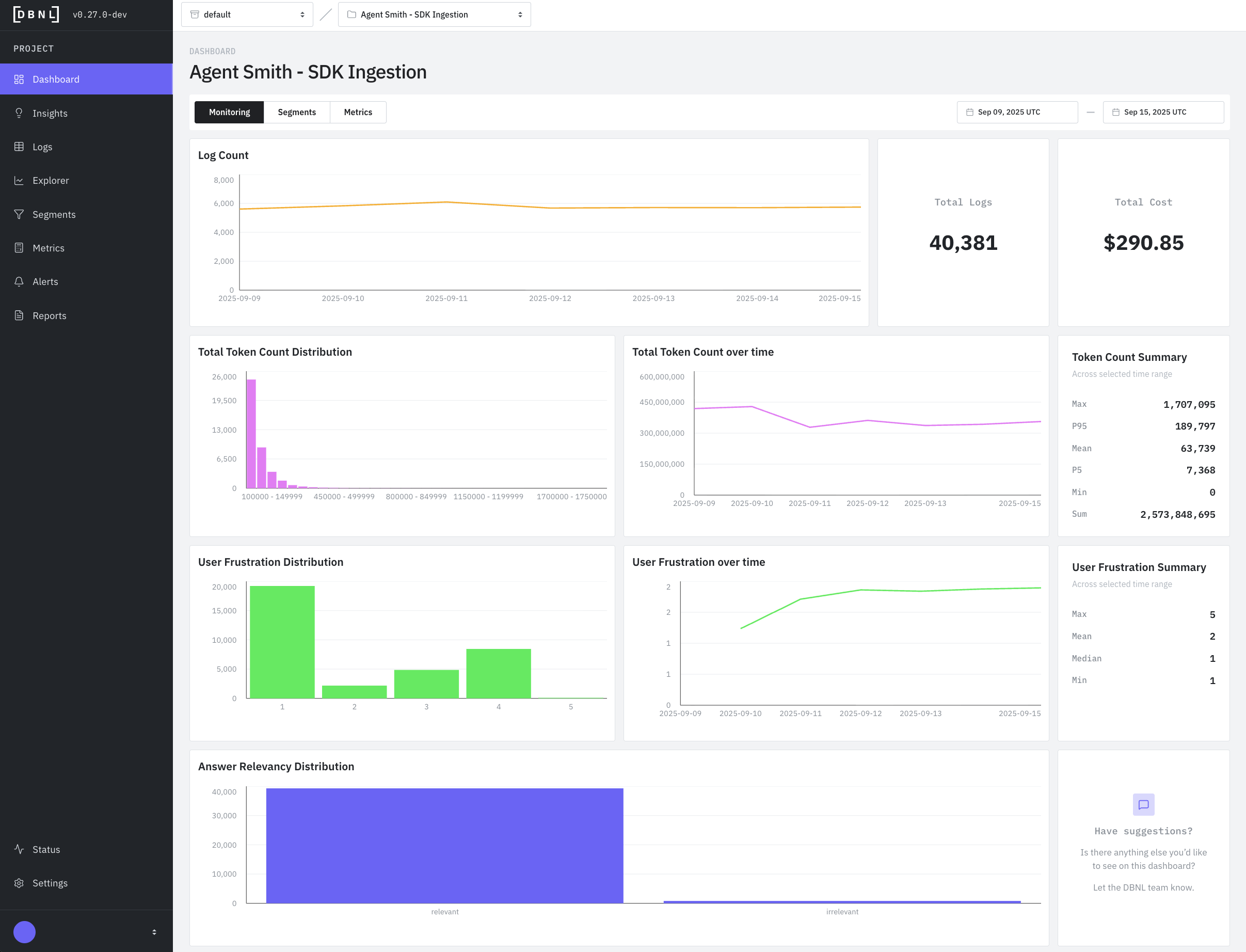
Default dashboard displaying recommended graphs and statistics for a specific time window (default: last 7 days) such as:
* **Log Count**: Time series of number of logs ingested per day in the time range.
* **Total Logs**: Total number of logs ingested from the time range.
* **Total Cost**: Total estimated cost for the underlying AI product being analyzed during the time range. Requires `total_cost` to be reported as part of log ingestion.
* **Total Token Count Distribution**: Histogram of token counts for all logs in the time range. Requires `total_token_count` to be reported as part of log ingestion.
* **Total Token Count over time**: Time series of total token count per day ingested in the time range. Requires `total_token_count` to be reported as part of log ingestion.
* **Token Count Summary**: Statistics for the Token Count column for the time range. Requires `total_token_count` to be reported as part of log ingestion. Included statistics are:
* **Max**: The highest `total_token_count` observed over the time range.
* **P95**: The 95th percentile of `total_token_count` observed over the time range.
* **Mean**: The average `total_token_count` observed over the time range.
* **P5**: The 5th percentile of `total_token_count` observed over the time range.
* **Min**: The minimum `total_token_count` observed over the time range.
* **Sum**: The sum of all `total_token_count` observed over the time range.
* **User Frustration Distribution**: Histogram of the default [`user_frustration`](/v0.26.x/workflow/metrics.md#user_frustration) [Metric](/v0.26.x/workflow/metrics.md) for all logs in the time range.
* **User Frustration over time**: Time series of the daily default [`user_frustration`](/v0.26.x/workflow/metrics.md#user_frustration) [Metric](/v0.26.x/workflow/metrics.md) for in the time range.
* **User Frustration Summary**: Statistics for the default [`user_frustration`](/v0.26.x/workflow/metrics.md#user_frustration) [Metric](/v0.26.x/workflow/metrics.md) for the time range.
* **Max**: The highest of the default [`user_frustration`](/v0.26.x/workflow/metrics.md#user_frustration) [Metric](/v0.26.x/workflow/metrics.md) observed over the time range.
* **Mean**: The average of the default [`user_frustration`](/v0.26.x/workflow/metrics.md#user_frustration) [Metric](/v0.26.x/workflow/metrics.md) observed over the time range.
* **Median**: The 50th percentile of the default [`user_frustration`](/v0.26.x/workflow/metrics.md#user_frustration) [Metric](/v0.26.x/workflow/metrics.md) observed over the time range.
* **Min**: The minimum of the default [`user_frustration`](/v0.26.x/workflow/metrics.md#user_frustration) [Metric](/v0.26.x/workflow/metrics.md) observed over the time range.
* **Answer Relevancy Distribution**: Histogram of the default [`answer_relevancy`](/v0.26.x/workflow/metrics.md#answer_relevancy) [Metric](/v0.26.x/workflow/metrics.md) for all logs in the time range.
### Segments Dashboard
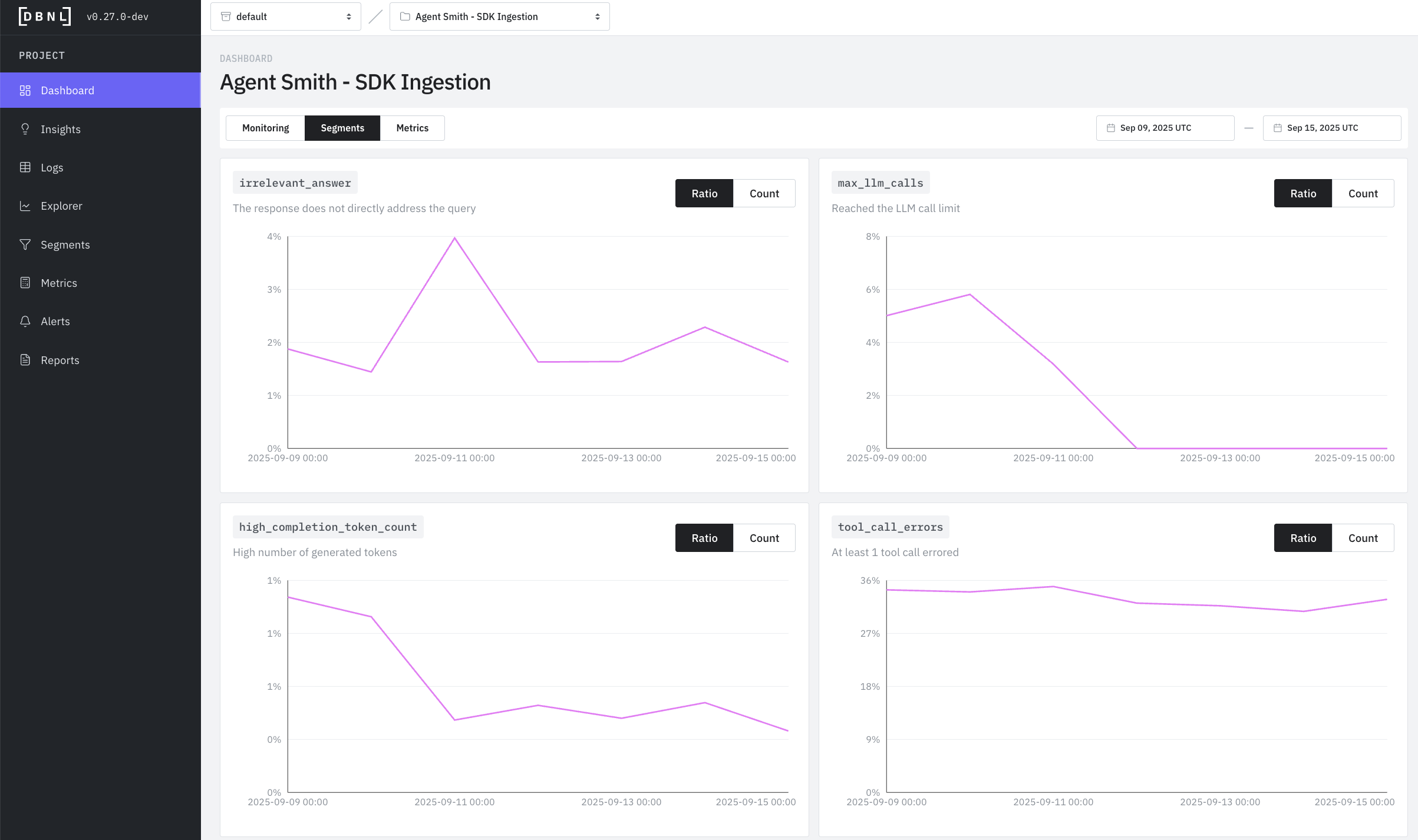
Dashboard displaying all tracked [Segments](/v0.26.x/workflow/segments.md) as time series of daily counts for each [Segment](/v0.26.x/workflow/segments.md) within a specific time range (default: last 7 days). Count histograms can be displayed as:
* **Ratio**: The percentage of total logs for each day in the time range that are within the [Segment](/v0.26.x/workflow/segments.md).
* **Count**: The total number of logs for each day in the time range that are within the [Segment](/v0.26.x/workflow/segments.md).
### Metrics Dashboard
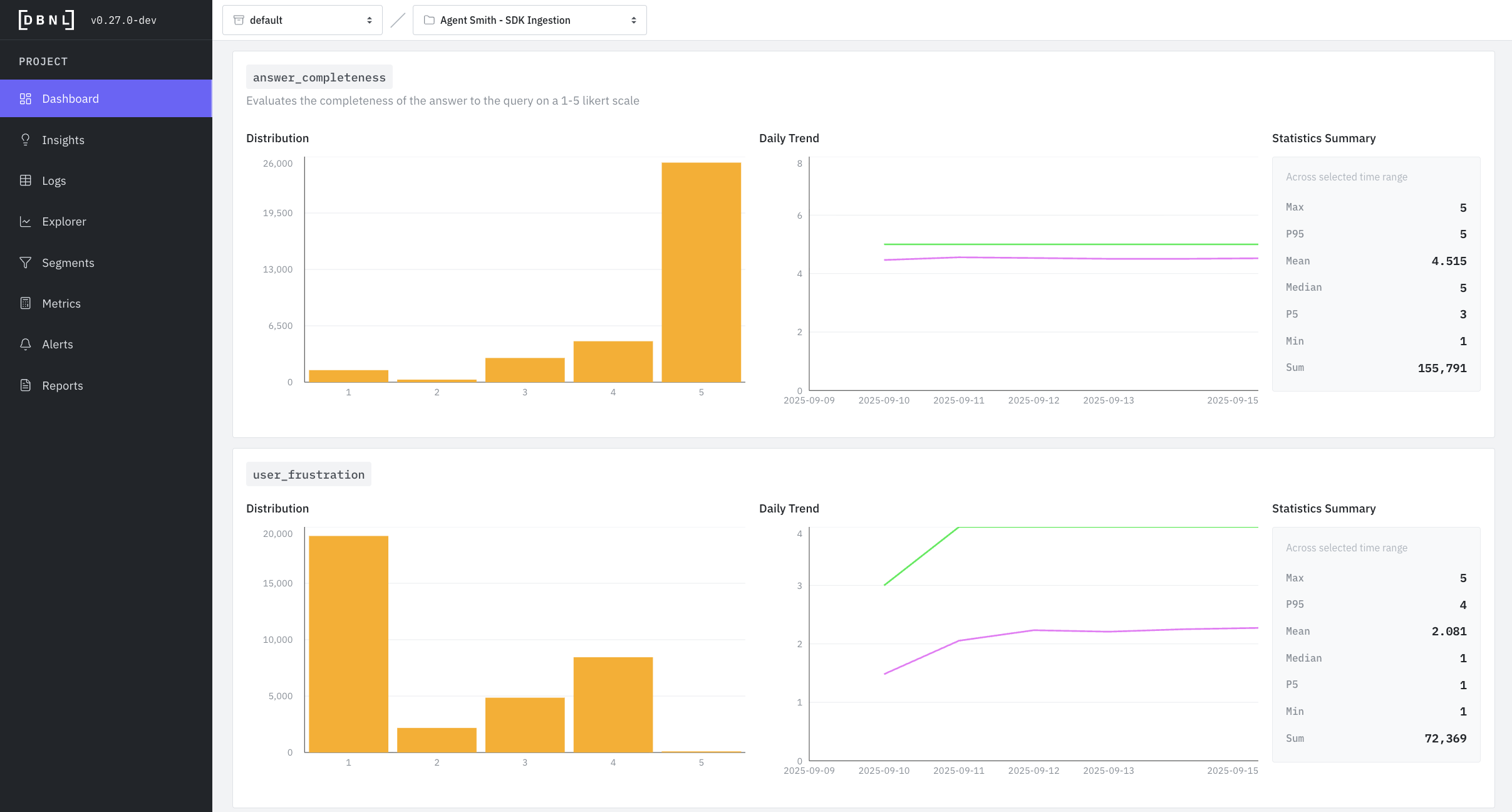
Dashboard displaying all custom [Metrics](/v0.26.x/workflow/metrics.md) as histograms, time series, and statistics summaries for all logs within a specific time range (default: last 7 days).
* **Distribution**: The histogram of observed values for the [Metric](/v0.26.x/workflow/metrics.md) during the time range.
* **Daily Trend**: The time series of the average and 95th percentile of the [Metric](/v0.26.x/workflow/metrics.md) for each day in the time range.
* **Statistics Summary**: Statistics for the [Metric](/v0.26.x/workflow/metrics.md) in the time range consisting of:
* **Max**: The maximum observed value for the [Metric](/v0.26.x/workflow/metrics.md) in the time range.
* **P95**: The 95th percentile of the observed values of the [Metric](/v0.26.x/workflow/metrics.md) in the time range.
* **Mean**: The average of the observed values of the [Metric](/v0.26.x/workflow/metrics.md) in the time range.
* **Median**: The 50th percentile of the observed values of the [Metric](/v0.26.x/workflow/metrics.md) in the time range.
* **P5**: The 5th percentile of the observed values of the [Metric](/v0.26.x/workflow/metrics.md) in the time range.
* **Min**: The minimum observed value for the [Metric](/v0.26.x/workflow/metrics.md) in the time range.