> For the complete documentation index, see [llms.txt](https://docs.dbnl.com/llms.txt). Markdown versions of documentation pages are available by appending `.md` to page URLs; this page is available as [Markdown](https://docs.dbnl.com/v0.26.x/reference/query-language.md).
# Query Language
An overview of the DBNL Query Language
The DBNL Query Language is a SQL-like language that allows for querying data in Runs for the purpose of drawing visualizations, defining metrics or evaluating tests.
## Expressions
An expression is a combination of literals, values, operators, and functions. Expressions can evaluate to scalar or columnar values depending on their types and inputs. There are three types of expressions that can be composed into arbitrarily complex expressions.
### Literal Expressions
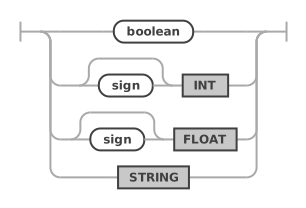
Literal expressions are constant-valued expressions.
Literal expression
| Type | Example |
| --------- | --------------- |
| `boolean` | `true` |
| `int` | `42` |
| `float` | `1.0` |
| `string` | `'hello world'` |
### Column and Scalar Expressions
Column and scalar expressions are references to columns or scalar values in a Run. They use dot-notation to reference a column or scalar within a Run.
Column expression
For example, a column named `score` in a Run with id `run_1234` can be referenced with the expression:
```
run_1234.score
```
### Function Expressions
Function expressions are functions evaluated over zero or more other expressions. They make it possible to compose simple expressions into arbitrarily complex expressions.
Function expression
For example, the `word_count` function can be used to compute the word count of the `text` column in a Run with id `run_1234` with the expression:
```
word_count(run_1234.text)
```
#### Operators
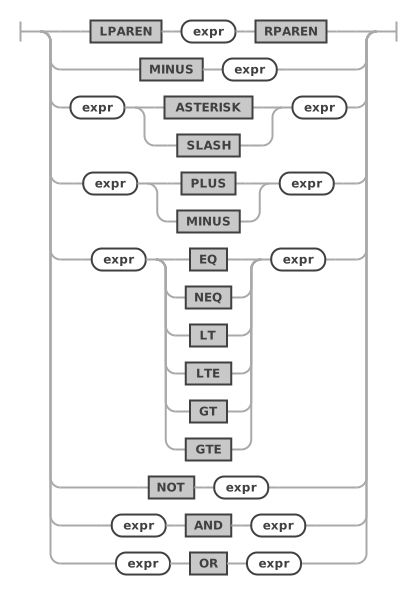
Operators are aliases for function expressions that enhance readability and ease of use. Operator precedence is the same as that of most SQL dialect.
Operators
**Arithmetic operators**
Arithmetic operators provide support for basic arithmetic operations.
| Operator | Function | Description |
| -------- | ---------------- | -------------------- |
| `-a` | `negate(a)` | Negate an input. |
| `a * b` | `multiply(a, b)` | Multiply two inputs. |
| `a / b` | `divide(a, b)` | Divide two inputs. |
| `a + b` | `add(a, b)` | Add two inputs. |
| `a - b` | `subtract(a, b)` | Subtract two inputs. |
**Comparison operators**
Comparison operators provide support for common comparison operations.
| Operator | Function | Description |
| -------- | ----------- | ------------------------ |
| `a = b` | `eq(a, b)` | Equal to. |
| `a != b` | `neq(a, b)` | Not equal to. |
| `a < b` | `lt(a, b)` | Less than. |
| `a <= b` | `lte(a, b)` | Less than or equal to. |
| `a > b` | `gt(a, b)` | Greater than. |
| `a >= b` | `gte(a, b)` | Greater than or equal to |
**Logical operators**
Logical operators provide support for boolean comparisons.
| Operator | Function | Description |
| --------- | ----------- | -------------------------- |
| `not b` | `not(a, b)` | Logical not of input. |
| `a and b` | `and(a, b)` | Logical and of two inputs. |
| `a or b` | `or(a, b)` | Logical or of two inputs. |
## Null Semantics
The DBNL Query Language follows the null semantics of most SQL dialect. With a few exception, when a null value is used as an input to a function or operator, the result is null.
| Expression | Result |
| ------------------ | ------ |
| `4 > null` | `null` |
| `null = null` | `null` |
| `null + 2` | `null` |
| `word_count(null)` | `null` |
One exception to this is boolean functions and operators where ternary logic is used similar to most SQL dialects.
| a | b | a or b | a and b | not a |
| ------- | ------- | ------ | ------- | ------- |
| `true` | `null` | `true` | `null` | `false` |
| `false` | `null` | `null` | `false` | `true` |
| `null` | `true` | `true` | `null` | `null` |
| `null` | `false` | `null` | `false` | `null` |
| `null` | `null` | `null` | `null` | `null` |