

Overview - DBNL
Distributional's adaptive analytics platform
What is DBNL?
DBNL is an Adaptive Analytics platform designed to discover and track hidden behavioral signals in production AI logs and traces over time. The platform gives a detailed snapshot of aggregate AI product behavior and surfaces Insights as subsets of log data corresponding to patterns in behavioral signals that can be investigated and tracked over time. This empowers AI teams to better understand the behavior of their users and AI products so that they can fix and improve those products with confidence.
Start analyzing right away with the Quickstart
How do I deploy DBNL?
DBNL is openly distributed and free to deploy within your cloud environment or on-premise, keeping your data safe, secure, and always under your control. Head over to our Quickstart to start performing Adaptive Analytics on your production AI logs and traces right away.
How does DBNL work?
DBNL integrates with the existing AI infrastructure within your environment to easily and securely perform adaptive analytics for any AI product. The DBNL Data Pipeline automatically ingests, enriches, and analyzes production AI logs and traces, surfacing behavioral signals. These signals are published as Dashboards and Insights, allowing users to discover, investigate, and track them as part of the DBNL Analytics Workflow. This process is repeated, adapting to previously tracked signals, providing deeper and more customized analytics over time.
Adaptive Analytics Flywheel
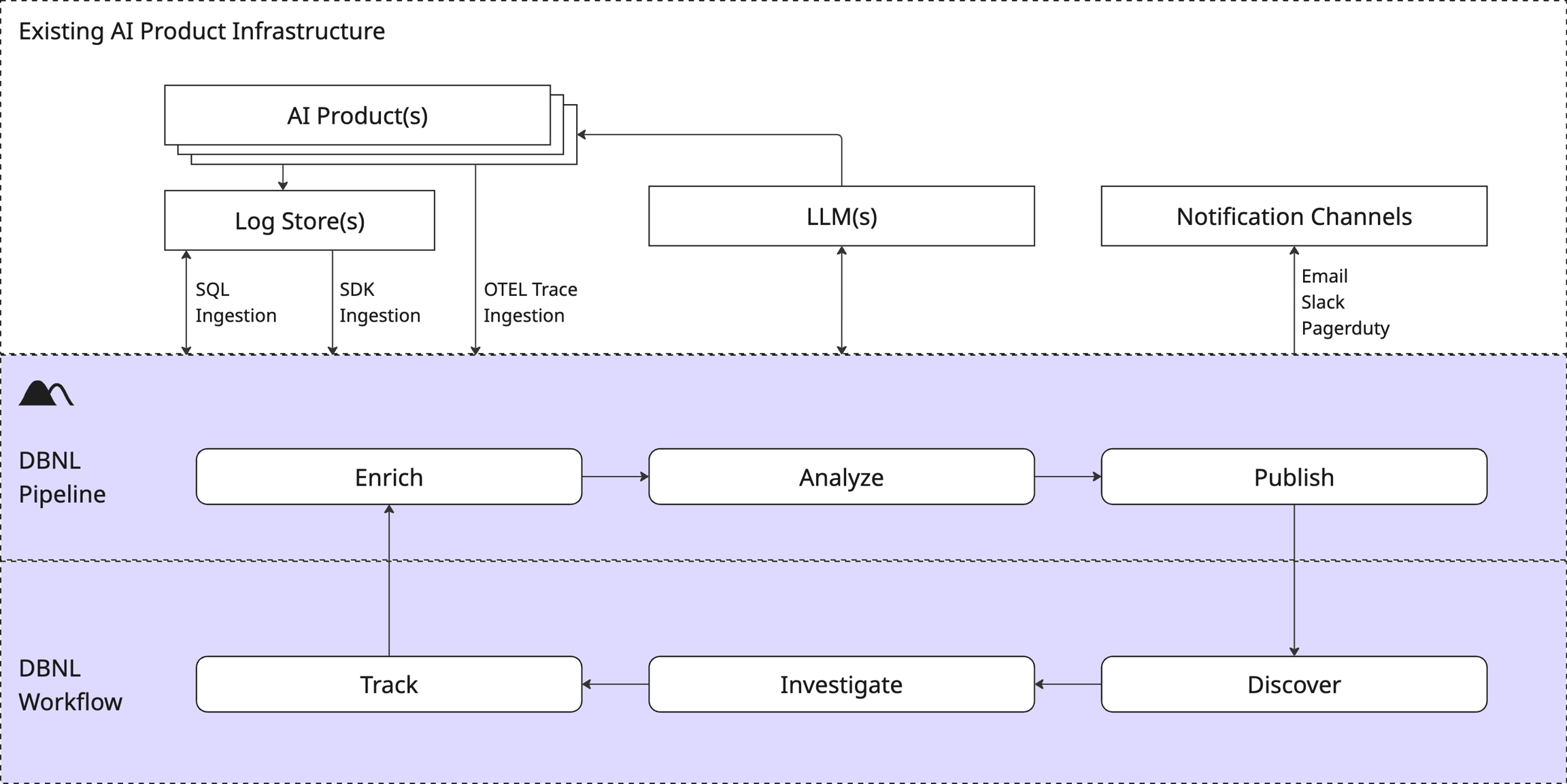
Ingest
Production log data from AI products is published continuously via OTEL Trace Ingestion or pushed in batches via SDK Log Ingestion or pulled in batches from existing tables via a SQL Integration Ingestion.
Enrich
Data is augmented with LLM-as-judge, NLP, and other behavioral Metrics provided by DBNL or customized by the user to create a vector of rich behavioral information for every log line, capturing the interplay and correlations between users, context, tools, models, and metrics. These behavioral vectors define a high-dimensional distributional fingerprint of behavior for the AI product rich with behavioral signals.
Analyze
Various unsupervised learning and statistical techniques are applied to the distributional fingerprint daily to discover Insights; filtered subsets of logs corresponding to changes in behavior, clusters of specific behaviors, and behavioral outliers.
Publish
Dashboards are updated and new Insights are generated to represent newly observed and discovered behavior from the latest production data.
Discover
Behavioral signals are presented to the user as Insights and Dashboards of observed behavior and previously tracked Metrics and Segments.
Investigate
Specific evidence related to behavioral signals can be explored and refined through population and temporal Exploration and inspection of the raw Logs.
Repeat
The workflow adapts to new information over time using tracked Metrics and Segments to guide deeper and more customized analysis automatically.
Next Steps
Ready to start using DBNL? Head straight to our Quickstart to get set up on the platform and start testing your AI products right away for free.
Want to learn more about the workflow? Check out the Adaptive Analytics Flywheel.
Want to understand more about the platform? Check out the Architecture, Deployment options, and other aspects of the Platform.
Was this helpful?