> For the complete documentation index, see [llms.txt](https://docs.dbnl.com/llms.txt). Markdown versions of documentation pages are available by appending `.md` to page URLs; this page is available as [Markdown](https://docs.dbnl.com/v0.27.x/workflow/explorer.md). Agents can also search and read this documentation through its [MCP server](https://docs.dbnl.com/~gitbook/mcp).

# Explorer

Investigate signals through direct graphical comparison.

The Explorer enables rapid analysis and triage of [Segments](https://docs.dbnl.com/v0.27.x/workflow/segments.md) by performing graphical and statistical comparison between different subsets of [Logs](https://docs.dbnl.com/v0.27.x/workflow/logs.md) over different time windows and/or filters.

## Accessing Explorer

You can access the Explorer in three ways:

1. **From the main navigation:** Click "Explorer" in the left sidebar
2. **From an Insight:** Click the "View in Explorer" button on any Insight card
3. **From the Logs page:** Apply filters to your logs, then click "View in Explorer" in the top-right corner

When accessed from an Insight or Logs page, the Explorer will pre-populate with your current filters.

There are three main types of exploration afforded by the Explorer:

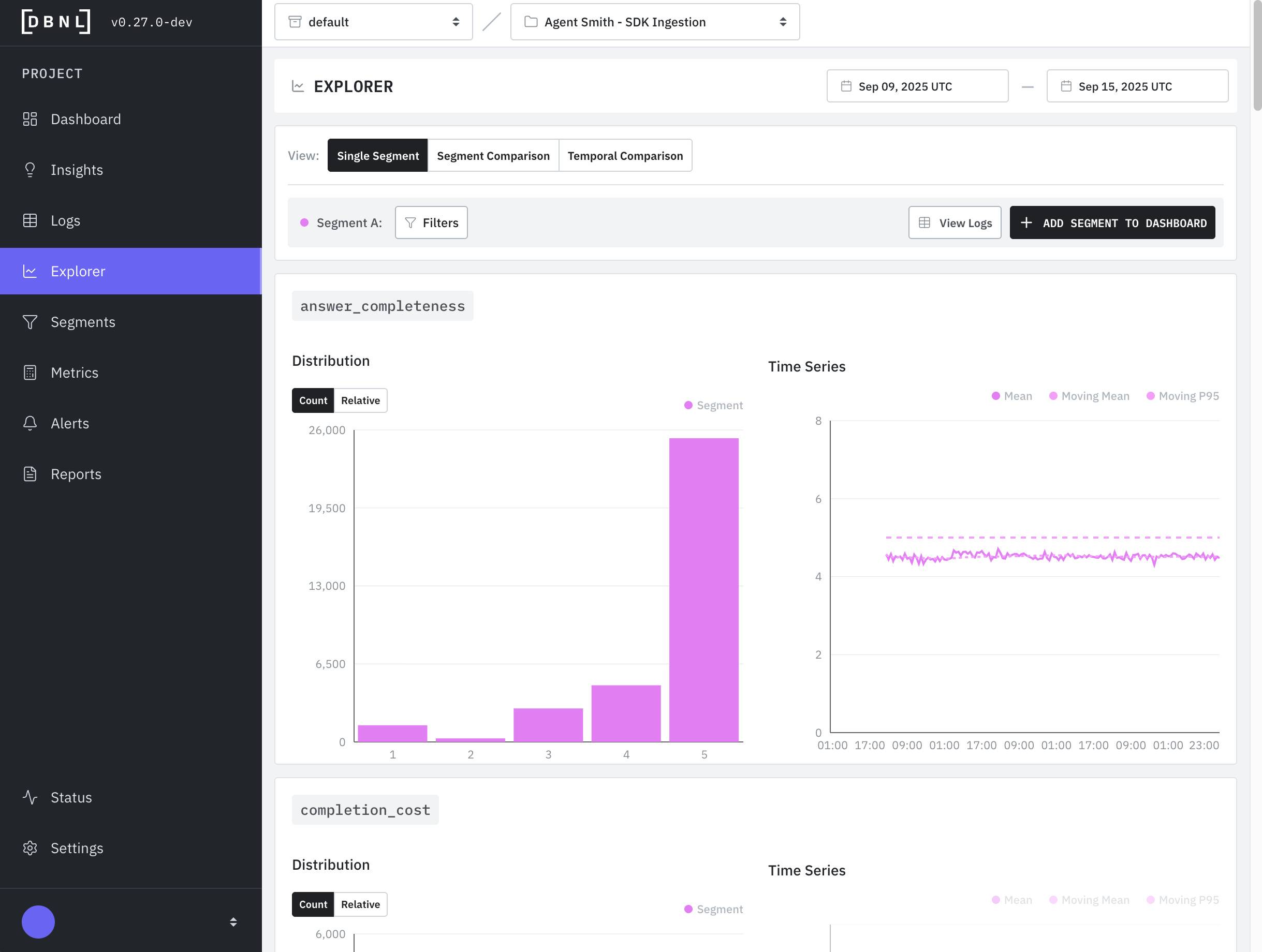
* [**Single Segment**](#single-segment): Quickly see all [Metrics](https://docs.dbnl.com/v0.27.x/workflow/metrics.md) for a given time window and single filter on the [Logs](https://docs.dbnl.com/v0.27.x/workflow/logs.md). This allows for an aggregate view of all Metrics.
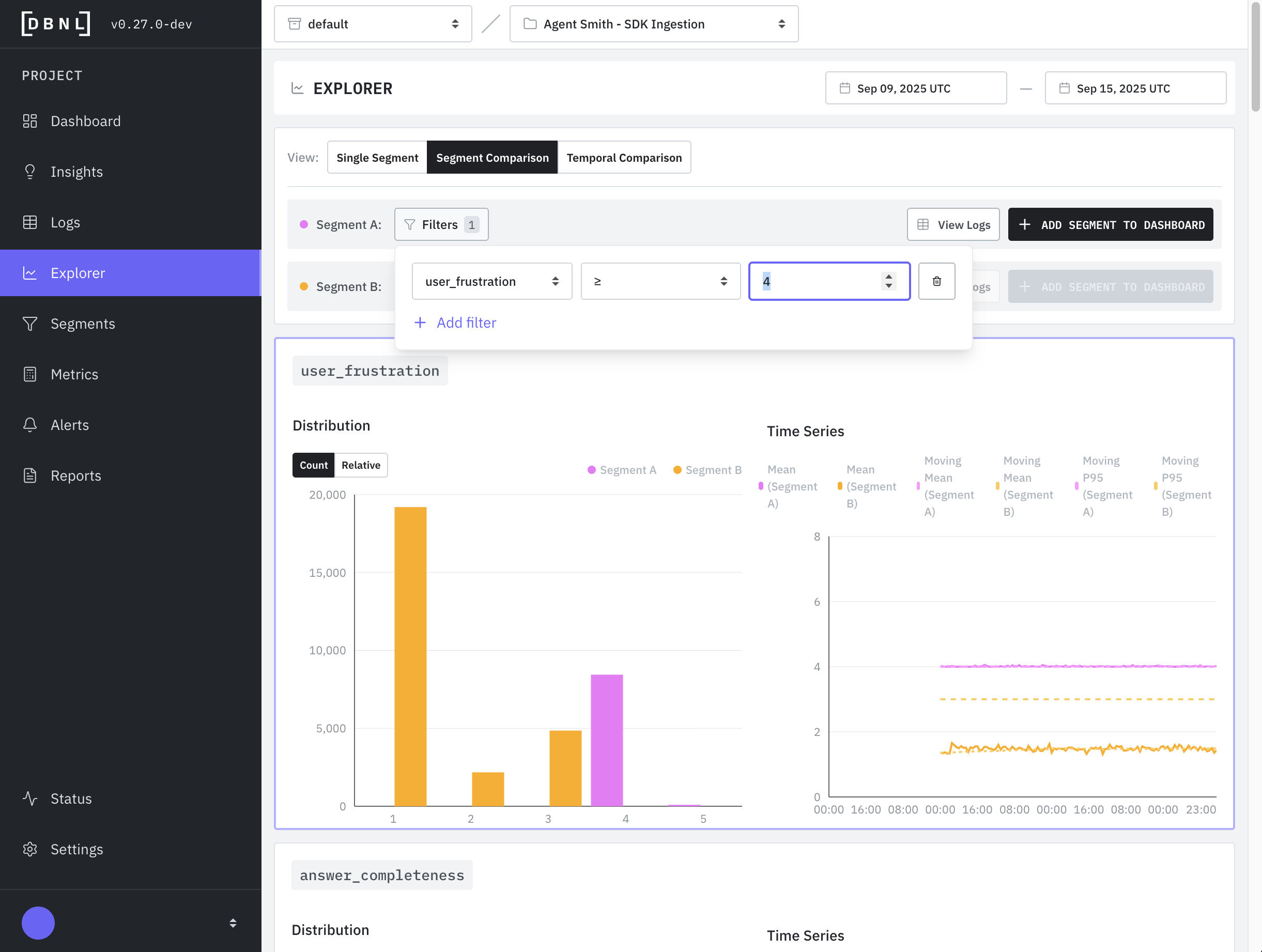
* [**Segment Comparison**](#segment-comparison): Compare two different filters on the [Logs](https://docs.dbnl.com/v0.27.x/workflow/logs.md) or a filter and its compliment across the same time window. This allows for comparison of [Metrics](https://docs.dbnl.com/v0.27.x/workflow/metrics.md) between filters or between a filters and the rest of the Log data.
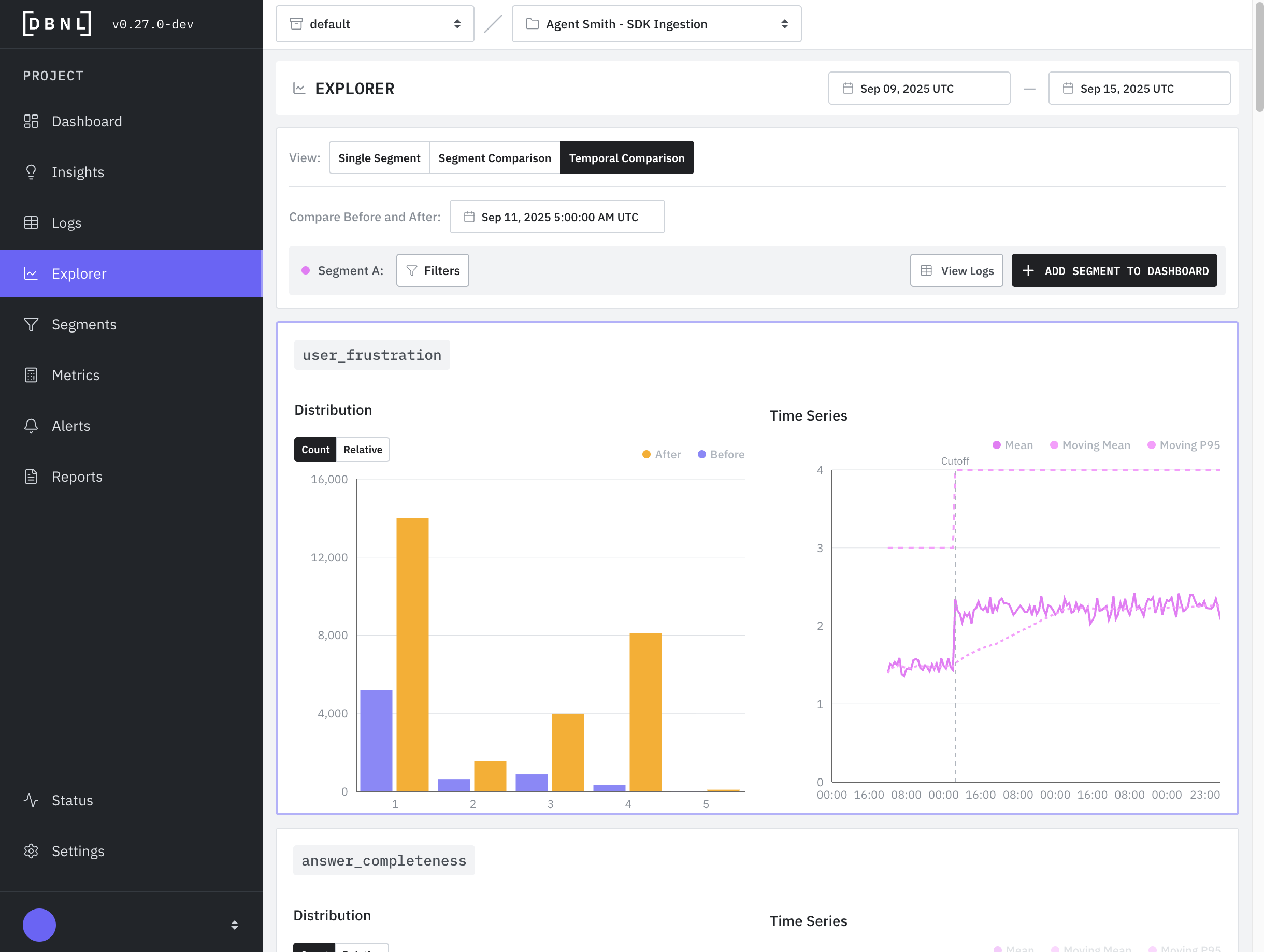
* [**Temporal Comparison**](#temporal-comparison)**:** Compare a single filter across two adjacent time windows. This allows for a [Metric](https://docs.dbnl.com/v0.27.x/workflow/metrics.md) comparison of before/after for a given [Segment](https://docs.dbnl.com/v0.27.x/workflow/segments.md).

### Single Segment

View all [Metrics](https://docs.dbnl.com/v0.27.x/workflow/metrics.md) for a given filter on the [Logs](https://docs.dbnl.com/v0.27.x/workflow/logs.md) in a time window. The filter can be optionally saved as [Segment](https://docs.dbnl.com/v0.27.x/workflow/segments.md) to be published to future [Segment Dashboards](https://docs.dbnl.com/v0.27.x/workflow/dashboards.md#segments-dashboard) as part of the [DBNL Data Pipeline](https://docs.dbnl.com/v0.27.x/configuration/data-pipeline.md).

<figure><img src="https://content.gitbook.com/content/8N8zzLtIch6ZiTSwWtXD/blobs/AK1whWl7rvPdW40AXWK6/image.png" alt=""><figcaption><p>The Single Segment Explorer page allows for quickly viewing all metrics for a filter within a time window.</p></figcaption></figure>

### Segment Comparison

Compare two different filters on the [Logs](https://docs.dbnl.com/v0.27.x/workflow/logs.md) or a filter and its compliment across the same time window. This allows for comparison of [Metrics](https://docs.dbnl.com/v0.27.x/workflow/metrics.md) between filters or between a filters and the rest of the Log data. Either of these filters can be optionally saved as [Segments](https://docs.dbnl.com/v0.27.x/workflow/segments.md) to be published to future [Segment Dashboards](https://docs.dbnl.com/v0.27.x/workflow/dashboards.md#segments-dashboard) as part of the [DBNL Data Pipeline](https://docs.dbnl.com/v0.27.x/configuration/data-pipeline.md).

<figure><img src="https://content.gitbook.com/content/8N8zzLtIch6ZiTSwWtXD/blobs/w38VaFsKtg74KXGHIeuP/image.png" alt=""><figcaption><p>The Segment Comparison Explorer page allows for quick comparison of two filters across a single time window.</p></figcaption></figure>

### Temporal Comparison

Compare a single filter across two adjacent time windows. This allows for a [Metric](https://docs.dbnl.com/v0.27.x/workflow/metrics.md) comparison of before/after for a given [Segment](https://docs.dbnl.com/v0.27.x/workflow/segments.md).

<figure><img src="https://content.gitbook.com/content/8N8zzLtIch6ZiTSwWtXD/blobs/C8BID631tcTKrFHnhcg7/image.png" alt=""><figcaption><p>The Temporal Comparison Explorer page allows for quick comparison of a single filter across two adjacent time windows.</p></figcaption></figure>