> For the complete documentation index, see [llms.txt](https://docs.dbnl.com/llms.txt). Markdown versions of documentation pages are available by appending `.md` to page URLs; this page is available as [Markdown](https://docs.dbnl.com/v0.24.x/using-distributional/runs.md).
# Runs
The Run is the core object for recording an application's behavior; when you upload a dataset from usage of your app, it takes the shape of a Run. As such, you can think of a Run as the results from a batch of uses or from a standard example set of uses of your application. When exploring or testing your app's behavior, you will look at the Run in DBNL either in isolation or in comparison to another Run.
Generally, you will use our [Python SDK](/v0.24.x/reference/python-sdk.md) to report Runs. The data associated with each Run is passed to DBNL [through the SDK](/v0.24.x/reference/python-sdk.md) as pandas dataframes.
## What's in a Run?
A Run contains the following:
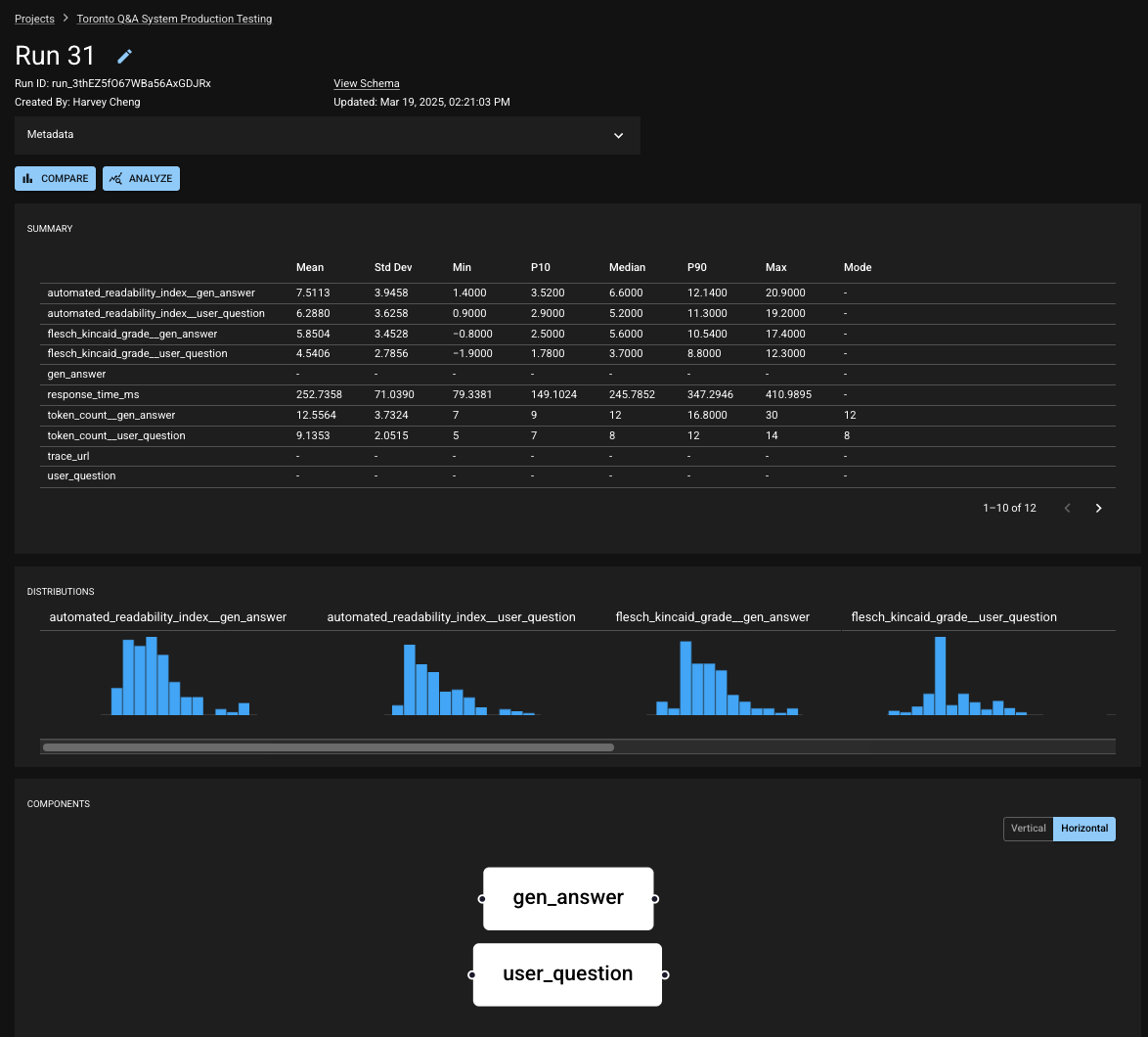
* a table of **results** where each row holds the data related to a single app usage (e.g. a single input and output along related metadata),
* a set of Run-level values, also known as **scalars**,
* structural information about the **components** of the app and how they relate, and
* user-defined **metadata** for remembering the context of a run.
Your Project will contain many Runs. As you report Runs into your Project, DBNL will build a picture of how your application is behaving, and you will utilize tests to verify that its behavior is appropriate and consistent. Some common usage patterns would be reporting a Run daily for regular checkpoints or reporting a Run each time you deploy a change to your application.
Runs live within a selected Project.
The structure of a Run is defined by its **schema**. This informs DBNL about what information will be stored in each result (the columns), what Run-level data will be reported (the scalars), and how the application is organized (the components).
A **component** is a mechanism for grouping columns based on their role within the app. You can also define an `index` in your schema to tell DBNL a unique identifier for the rows in your Run results. For more information, see the section on the [Run Schema](/v0.24.x/using-distributional/runs/reporting-runs.md#run-schema).
A Run in the DBNL UI
## Baseline and Experiment Runs
Throughout our application and documentation, you'll often encounter the terms "baseline" and "experiment". These concepts are specifically related to running tests in DBNL. The Baseline Run defines the comparison point when running a test; the Experiment Run is the Run which is being tested against that comparison point. For more information, see the sections on [Setting a Baseline Run](/v0.24.x/using-distributional/runs/setting-a-baseline-run.md) and [Running Tests](/v0.24.x/using-distributional/tests/running-tests.md).