> For the complete documentation index, see [llms.txt](https://docs.dbnl.com/llms.txt). Markdown versions of documentation pages are available by appending `.md` to page URLs; this page is available as [Markdown](https://docs.dbnl.com/v0.29.x/configuration/data-connections.md).
# Data Connections
How to get data into DBNL
Data Connections are how production AI log data is ingested into your DBNL [Deployment](/v0.29.x/platform/deployment.md) as part of the [Data Pipeline](/v0.29.x/configuration/data-pipeline.md). Each [Project](/v0.29.x/workflow/projects.md) has one ingestion method that is set at creation. If you need to change this later you can do this via the [Project settings page](/v0.29.x/workflow/projects.md#modifying-a-project).
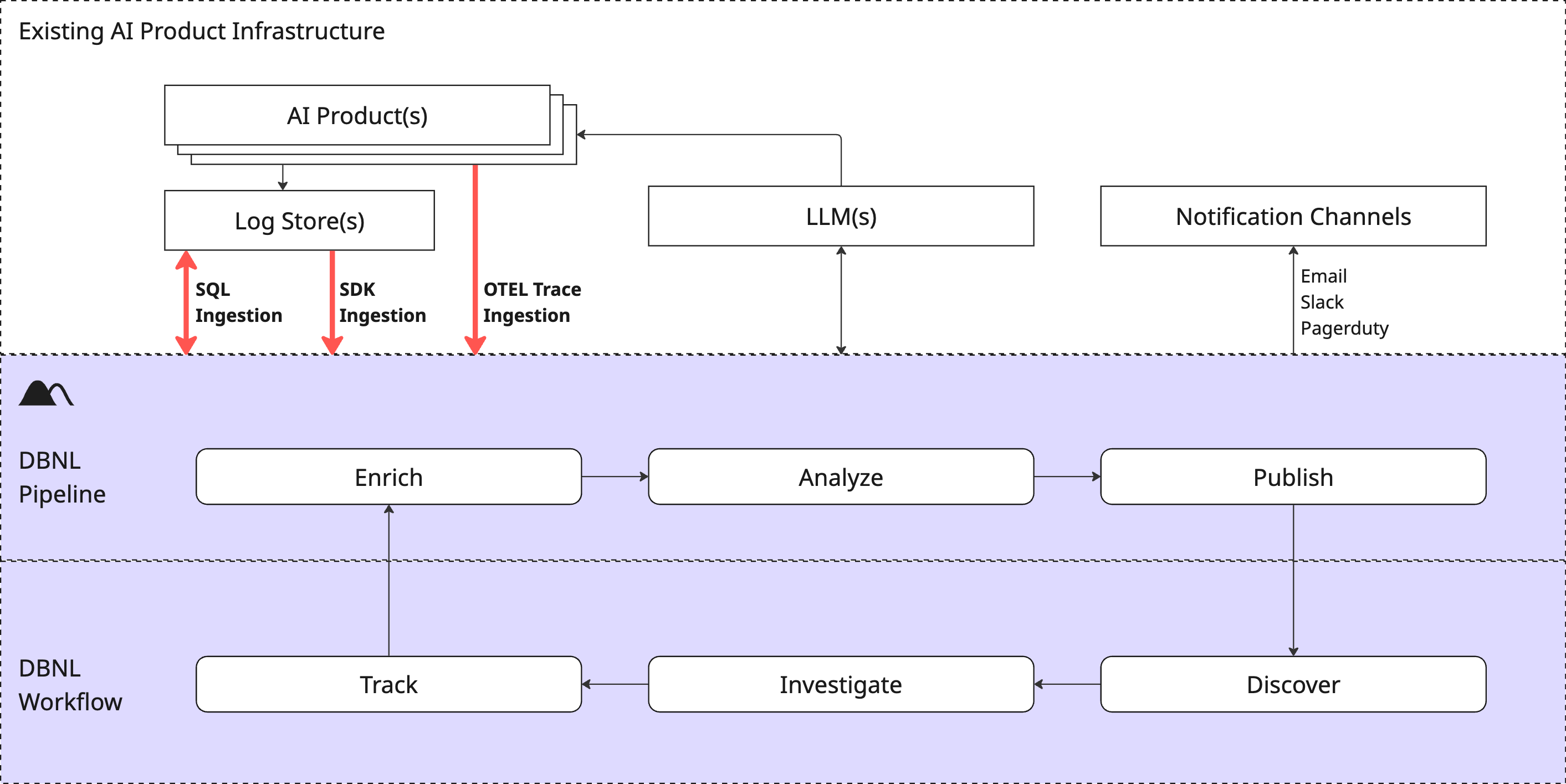
Data Connections are how Production AI log data is ingested into DBNL, kicking off the Analytics Workflow.
DBNL supports three methods of data ingestion:
* [OTEL Trace Ingestion](/v0.29.x/configuration/data-connections/otel-trace-ingestion.md): Publish OTEL traces directly to DBNL as the product runs.
* [SDK Log Ingestion](/v0.29.x/configuration/data-connections/sdk-log-ingestion.md): Push data manually or as part of a daily orchestration job using the [Python SDK](https://github.com/dbnlAI/docs/blob/main/reference/python-sdk.md).
* [SQL Integration Ingestion](/v0.29.x/configuration/data-connections/sql-integration-ingestion.md): Pull data from a SQL table into DBNL on a schedule.
{% hint style="warning" %}
Regardless of the data ingestion method, make sure your data adheres to the [DBNL Semantic Convention](/v0.29.x/configuration/dbnl-semantic-convention.md) to enable the richest analysis of the data.
{% endhint %}
| Ingestion Type | Pros | Cons |
| ------------------------- | ----------------------------------------------------------------------------------------------------------------------------------------------------------------------------------------------------------------- | -------------------------------------------------------------------------------------------------------------------------------------------------------------------- |
| OTEL Trace Ingestion |
Get rich data logged in a few lines of embedded code
Enables full trace inspection in Logs page
Automatically maps to DBNL Semantic Convention if using standard semantic types
|
Cannot backfill data, requiring a full week before first Insights
Clickhouse support needs to be enabled during installation of Deployment
|
| SDK Log Ingestion |
Most flexible, can contain a full trace as part of a log line
Can backfill previously logged data
|
Requires Python SDK code to be written and scheduled as part of external orchestration service
|
| SQL Integration Ingestion |
Leverages currently logged data in SQL tables
No code required
Scheduling from DBNL Platform
Can backfill previously logged data
|
Requires log data to be already flattened and stored in a SQL table
May require complex SQL queries to adapt to DBNL Semantic Convention
|
### Managing Data Connections
#### Creating a New Data Connection
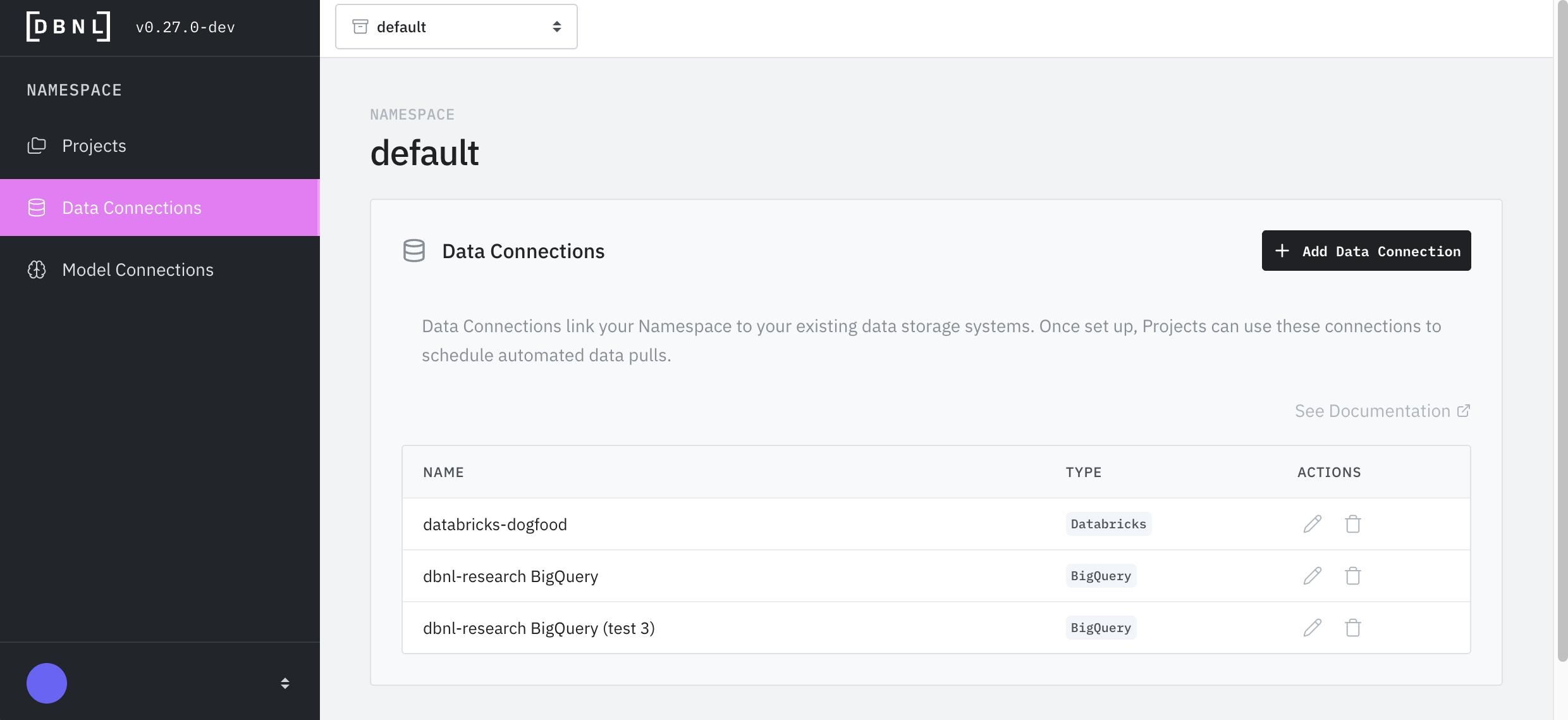
From the [Namespace](/v0.29.x/platform/administration.md#namespaces) landing page click on "Data Connections" on the left panel. On the Data Connections landing page "+ Add Data Connection" in the upper right. Provide a required name for the Data Connection and an optional description. All Data Connections will be available to any [User](/v0.29.x/platform/administration.md#users) creating a [Project](/v0.29.x/workflow/projects.md) in the [Namespace](/v0.29.x/platform/administration.md#namespaces).